



Full View
Similar items
Beautiful Girl Special English Neutral Packaging Pink Girl Luminous Keyboard Mouse Earphone Mouse Pad Three Or Four-piece Set
€76.15
€86.93 -12% OFF

Tablet Telefon Computer Bluetooth Drahtlose Maus Wiederaufladbare RGB Hintergrundbeleuchtung Mäuse Für IPad PC Laptop Tablet Telefon 2,4 GHz USB Maus
€43.79
€58.66 -25% OFF
Magnetic Switch Gaming Mechanical Keyboard RGB Backlit Wired Keyboard 8K Rapid Trigger Esports Custom Keyboard 8K High Return Rate Magnetic Switch Key
€129.23
€167.07 -22% OFF
Black Cartoon XDA Mechanical Keyboard Personalized Cute Keycap Heat Upgraded PBT Accepts Customization
€92.47
€148.33 -37% OFF
R1 Superlight Maus Bluetooth 2,4 G Kabellose Gaming-Maus PixArt PAW3311 Gaming-Sensor 6 Einstellbare DPI Für Bürospiele
€41.09
€57.74 -28% OFF
T-WOLF New Wired USB Office and Home Laptop 104 Key Multilingual Keyboard Present
€31.11
€40.34 -22% OFF
HXSJ-220 and Mouse Set 78 Key Thin Film Keyboard 1600dpi Rechargeable Silent Suitable for Home Games
€93.93
€133.77 -29% OFF
E-Sport USB-Maus Mit Kabel, Bunte LED-Gaming-Maus, 5000 DPI, Kabelgebundene Mäuse, Optische Kabelgebundene Gamer-Maus Für Desktop-Laptop-PC-Computer
€34.96
€50.21 -30% OFF
in Type GS c Inerface Expansion Gigabi Nework Cable Por USB Adaper PD W Fas Charging Por Exernal HD Inerfae Chargg
€54.44
€83.75 -34% OFF
True mechanical numeric keyboa, USB with cable, blue axis computer, laptop, financial accounting, external mini
€74.93
€91.80 -18% OFF
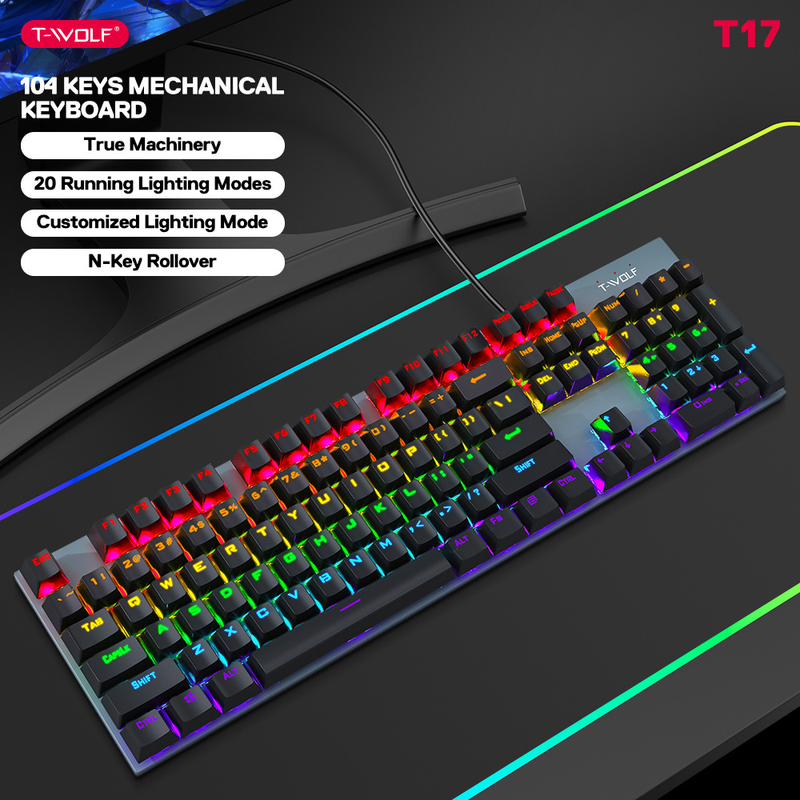
Thunderwolf T17 true mechanical keyboard, esports game, metal RGB glowing laptop, desktop computer, punk keyboard
€109.63€151.00
colour : T75 mechanical keyboard black


Quantity :

Report
Include copyright infringementFree Standard Shipping. See details
Estimated between Thu, Aug 6 and Wed, Aug 12
You can return the product within 30 days of receipt. See details
Shop with confidence

Money Back Guarantee
Get the item you ordered or your money back. Learn more
About this item
Sourced from TTnumeral
Seller assumes all responsibility for this listing.Item number: 19672730
Item specifics
Features
Mirror, Matte, Skin-Like
Features
Mirror, Matte, Skin-Like
Features
Mirror, Matte, Skin-Like
Axis
Red Axis, Green Axis, Black Axis
Axis
Red Axis, Green Axis, Black Axis
Axis
Red Axis, Green Axis, Black Axis
Numeric Keypad
Yes, No
Numeric Keypad
Yes, No
Connection
Wireless, Wired, Bluetooth
Connection
Wireless, Wired, Bluetooth
Connection
Wireless, Wired, Bluetooth
Size
<100Mm, 100Mm-120Mm, 121Mm-130Mm
Size
<100Mm, 100Mm-120Mm, 121Mm-130Mm
Size
<100Mm, 100Mm-120Mm, 121Mm-130Mm
Item description from the seller
{"styleType": "offer type 1", "items": "71487474580063692841856654220968083772776073351076759966737669724942843", "usemap": "_sdmap.0"}
T75:
Keyboard size: 435 * 125 * 33mm, bare metal weight: 695G
Packaging size: 470 * 170 * 50mm, including package weight: 856G
One box quantity: 10PCS Outer box size: 480 * 273 * 363mm One box weight: 9.1KG
T17:
Keyboard size: 425 * 120 * 35mm, bare metal weight: 650G
Packaging size: 450 * 150 * 42mm, including package weight: 784G
One box quantity: 20PCS Outer box size: 455 * 415 * 310mm One box weight: 16.5KG
C. The default startup mode is always on.
Light switching mode
1. Backlight stays on, press
2. Then enter "breathing".
Switch the backlight status with the key.
3. The constant light mode alternates between 1, 3, 5, and 2, 4, and 6.
4. Alternating breathing patterns of 1, 3, 5, and 2, 4, and 6.
5. Spread from the middle two groups to both sides and light up sequentially.
6. Light up sequentially by contracting from both sides to the middle.
7. From group to group 6, they are stacked downwards and illuminated sequentially.
8. From group 6 to group 1, stack and light up sequentially.
9. Spread from the middle two groups to both sides and light them up in sequence.
10. Shrink from both sides to the middle and then stack and light up sequentially.
11. Light up from 6, 5, 4, 3, 2, and 1 in order of rear end collision
12. Light up the rear end in the order of 1, 2, 3, 4, 5, and 6.
D. FN+↑, ↓ Adjust backlight brightness FN+SCRLK Turn off backlight
FN+←, → Adjust the backlight breathing frequency, default to high gear. When the backlight is breathing, FN+↑, ↓ can also adjust the backlight brightness simultaneously.
FN+- When adjusting, breathing and flickering are accelerated, with 3 levels of adjustment.
When adjusting FN+←, breathing and flicker are slowed down, and there is a 3-speed adjustment.
When adjusting FN+↑, the overall brightness of the light increases, increasing in three levels.
When adjusting FN+↓, the overall brightness of the lights decreases, decreasing in 3rd gear, and turning off the button lights in 4th gear


Videos
Videos for this product
